WisDOT Civil 3D 2026 - Subassembly updates
Last updated: 2026-01-06
WisDOT subassembly updates
- Most WisDOT subassemblies had significant updates made to them for Civil 3D 2026
- WisDOT sub point codes have been changed to a surface-based structure . WisDOT surface-based point codes explained
-
Automated point code suffixes have been added to many WisDOT subs. WisDOT subassembly automated point code suffixes explained
Info: Users with projects using WisDOT subs with previous point codes do not need to update to the new subassemblies.
Subassembly versions
Civil 3D 2026 subassemblies are referenced to an external file called a PKT file.
- All existing dwgs with subassemblies will still be using the non PKT subassemblies (used in C3D 2022 and earlier).
- The non PKT subassemblies will be fully supported but will not be updated.
The non PKT subassemblies can be changed into the new subassemblies by using the Change Subassembly workflow described in the Subassembly Updates section, option #2 below.
Subassembly Updates
When a subassembly PKT file that is referenced into a drawing is updated, symbols and tooltips are displayed next to the items in the Prospector tree to alert you. You have two options on how to respond to the alerts:
- You can right-click the out-of-date items and select Update All Subassemblies to update the subassemblies in the drawing. This will update the subassemblies to the latest updated version.
- Or right-click the out-of-date items and select Change Subassembly to select a different PKT file.
- To keep the current version of the subassembly without updating, select the pkt name of the subassembly that includes the version appended to the end of the subassembly name that matches the current version you are using in the dwg. All Civil 3D 2026 PKT file names end with _26 (ex. CGBasic_26.PKT)
All 2026 and previous subassembly pkt files are stored in C:\WisDOT\Stnd\C3D2026\Components\Assemblies\Subassemblies
Info: The most current version of a subassembly pkt file will have a Civil 3D release year appended to it. Changing a subassembly to a pkt with a version in the name will make the subassembly static and it will not receive and update notices.
WisDOT subassembly versions in DWG
The following image shows how current WisDOT subassemblies from 2024 and 2026 will look in Civil 3D > Toolspace > Prospector.
It is ok for the subassembly version to be different than the Civil 3D software version

WisDOT subassemblies that have an updated PKT file
WisDOT subassemblies will generally not be updated within a software version unless there is a bug fix or a critical update. The following shows how a subassembly will look if the PKT file that subassembly is based on is updated.
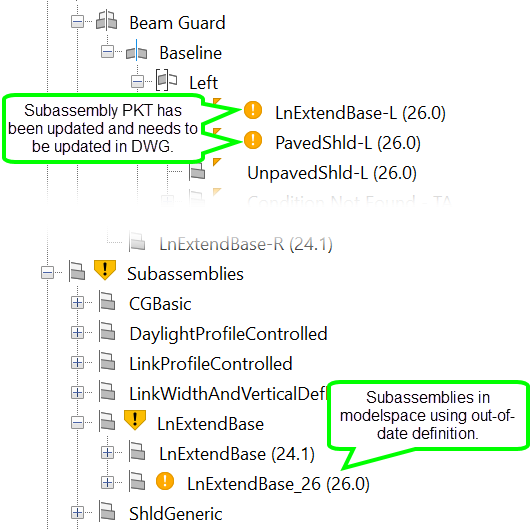
The subassembly definition can be updated with Right-click subassembly definition > Update All Subassemblies
