GenCFFinalLink
Last updated: 2026-01-06
 Description
This subassembly inserts the final cut or fill slope link, closing the sections to cut or fill slope intersect point.
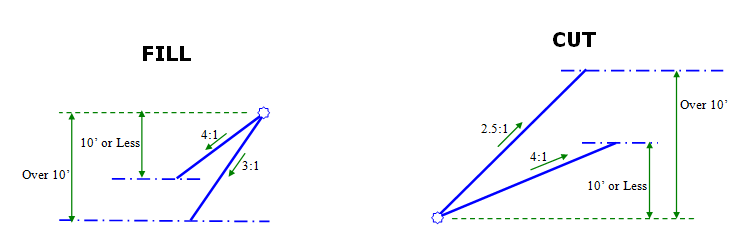
The final cut or fill link can be allowed to follow WisDOT standards for steep and flat rates based on a maximum height specified, or the user can override this standard with a distance, offset or slope that controls the final link. An input parameter controls which intercept of the daylight surface to use when multiple intersections are found.
Behavior
This subassembly attempts to find all possible daylight points for the cut or fill slope condition. If one or more daylight points are found using the slope parameters given, they are ordered and numbered by increasing offset from the attachment point. The daylight link is terminated at the point that matches the Intercept Number Value. If the Intercept Number Value is higher than the number of intercepts found, the last intercept is used. The attachment point elevation is checked against the daylight surface to determine if the section is in the cut or fill condition.
Fill section
If a fill condition is determined, the logical steps used are as follows:
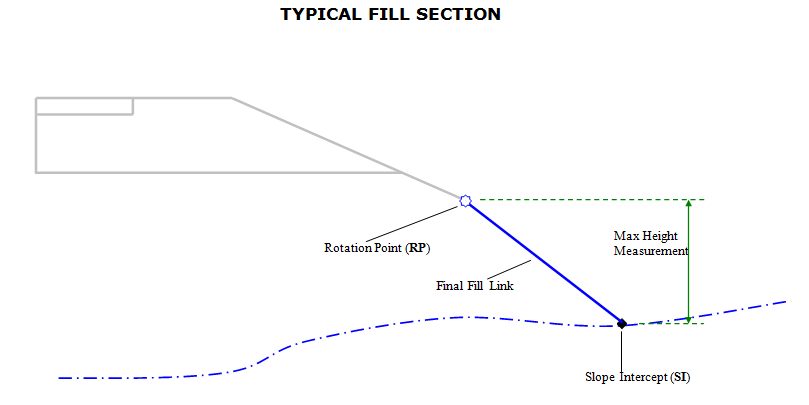
- The attachment point is typically the rotation point in fill sections.
- To close to the daylight surface in fill:
- If Override SlopeType is set to ‘No', the intercept to the daylight surface is calculated using the Flat Rate of Fill Slope value and the Intercept Number Value to determine the intersection point to use if multiples exist.
- If the height of the flat fill slope exceeds the Max Height, the intercept to the daylight surface is re-calculated using the Steep Rate of Fill Slope value.
If Override Slope Type is set to anything other then ‘No', then the Daylight Link is defined using the parameter set in Override Slope Value, rather then the Flat and Steep Rate of Fill Slope.
Cut section
If a cut condition is determined, the logical steps used are as follows:
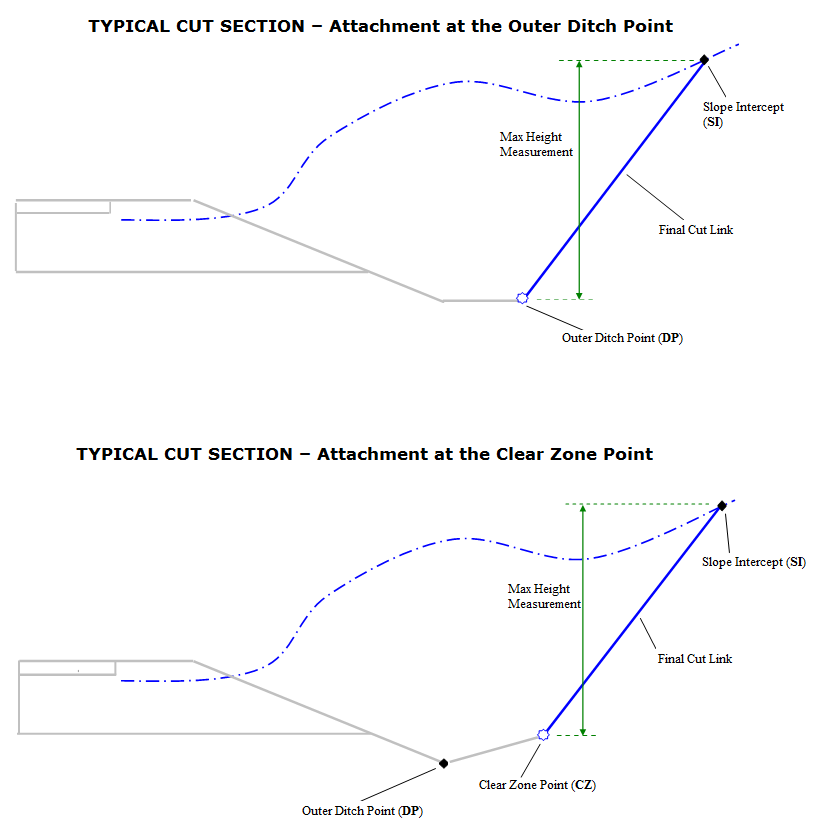
- The attachment point is typically the Clear Zone Point (when the clear zone distance falls outside the ditch point) or the Outer Ditch Point (when the clear zone distance falls inside the ditch point).
- To close to the daylight surface in cut:
- If Override Slope Type is set to ‘No', the intercept to the daylight surface is calculated using the Flat Rate of Cut Slope value and the Intercept Number Value to determine the intersection point to use if multiples exist.
- If the height of the flat cut slope exceeds the Max Height, the intercept to the daylight surface is re-calculated using the Steep Rate of Cut Slope value.
If Override Slope Type is set to anything other then ‘No', then the Final Cut Link is defined using the parameter set in Override Slope Value, rather then the Flat and Steep Rate of Cut Slope.
Attachment & layout mode operation
The attachment point is the first point of the final link. The subassembly is typically attached at the clear zone point or outer ditch point in cut sections, and typically the rotation point in fill sections. This component can be attached to either the left or right side.
In layout mode, this subassembly shows both the cut and fill condition flat-slope solutions. The daylight links are extended outward for a horizontal distance of 10 feet and terminate with arrowheads pointing outwards.
Input parameters
Info: All dimensions are in feet unless otherwise noted. All slopes are in run-over-rise form (for example, 4:1) unless indicated as a percent slope with a "%" sign.
| Parameter | Description | Type | Default |
|---|---|---|---|
| Side | Specifies which side to place the subassembly | Left / Right | Right |
| Max Height | Height used to determine whether slope of Cut Slope or Fill Slope uses flat or steep rate. | Numeric, positive | 10.0 ft. |
| Steep Rate of Cut Slope | Default slope rate of last link in cut when depth of cut is greater then Max Height. | Slope, positive | 2.5:1 |
| Flat Rate of Cut Slope | Default slope rate of last link in cut when depth of cut is less then Max Height. | Slope, positive | 4:1 |
| Steep Rate of Fill Slope | Default slope rate of last link in fill when depth of fill is greater then Max Height. | Slope, positive | 3:1 |
| Flat Rate of Fill Slope | Default slope rate of last link in fill when depth of fill is less then Max Height. | Slope, positive | 4:1 |
| Override Slope Type | Overrides the steep/flat rate of final cut or fill slope used to intersect the Daylight Surface. |
String, Combo List of options: a.) No, b.) Distance, c.) Offset, d.) Slope, e.) Target Object |
No |
| Override Slope Value1 | The distance or offset value to use when overriding the Slope of the final link intersecting the Daylight Surface with Override Type Distance or Offset. When Offset is specified as the Override Type, A negative value indicates an offset to the left of the baseline. | Numeric | 0.0 |
| Override Slope Value2 | The slope value to use when overriding the backslope of the final link intersecting the Daylight Surface with Override Type Slope. | Slope, positive | 0 |
| Intercept Number | The number of the intercept to save. If the Intercept Number value is greater than the actual number of intercepts, the highest intercept found is used. Intercept number is ignored when Override Slope Type is Distance or Offset. | Numeric, positive, integer | 1 |
Target parameters
This section lists the parameters in this subassembly that can be mapped to a target object such as a surface, alignment, or profile object in a drawing. For more information, see Setting and Editing Targets in the AutoCAD Civil 3D User's Guide Help.
| Parameter | Description | Status |
|---|---|---|
| Daylight Surface | Name of the Surface for Daylighting. The following object types can be used as targets for specifying this surface: surfaces | Required |
| Final Link Target Offset | Object that defines the location of the offset of the Daylight Point. The following object types can be used as targets for specifying the width: alignments, polylines, feature lines, or survey features. | Optional |
Output parameters
None
Point, Link, and Shape codes
| Point/Link/Shape | Codes | Description |
|---|---|---|
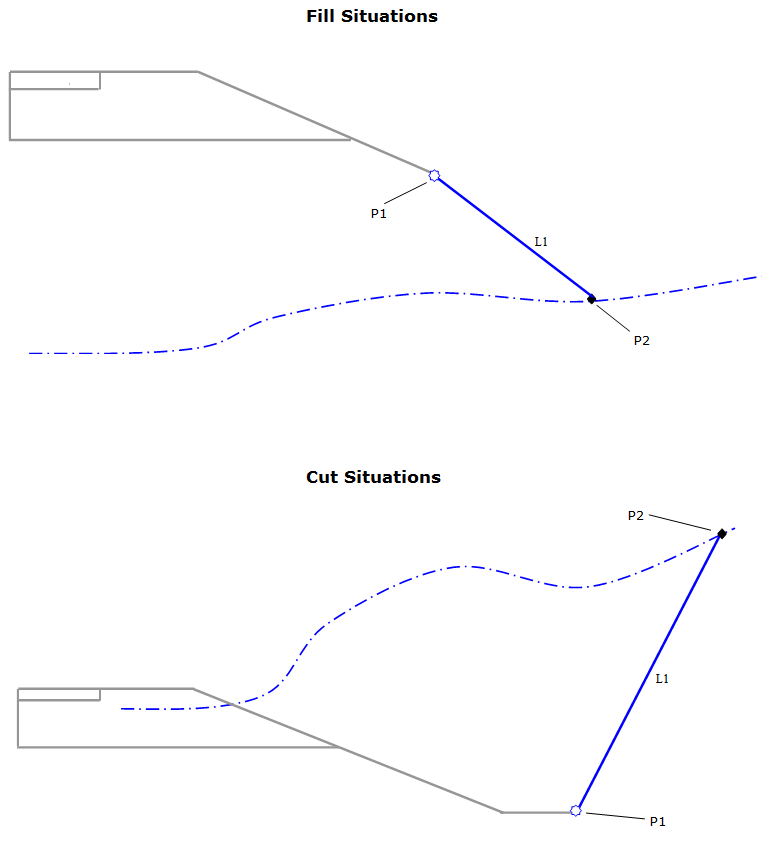
| P2 |
SI Daylight Daylight_Cut Daylight_Fill |
Slope Intercept Point in Cut and Fill |
| L1 |
Datum Top LABELSLP |
Finished Grade Surface Finished Grade Links to Have Slopes Labeled in Section View |